



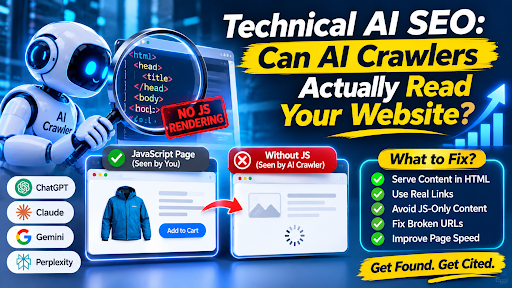
Writing excellent content is wasted if the system you want to cite it only sees a blank page. For many modern websites, that is a real risk. The cause is usually JavaScript.
This AI SEO explains what the evidence says, how to test your own site in minutes, and what to fix first.
The Evidence: Most AI Crawlers Don’t Run JavaScript
The best-known study comes from Vercel and the analytics firm MERJ, which examined crawler behavior across Vercel’s network. Its results consistently showed that none of the major AI crawlers it tested render JavaScript, including OpenAI’s OAI-SearchBot, ChatGPT-User and GPTBot, and Anthropic’s ClaudeBot.
A detail makes this more striking. ChatGPT’s and Claude’s crawlers fetched JavaScript files in 11.50% and 23.84% of requests respectively, but didn’t execute them, so they can’t read client-side rendered content. The files were downloaded, yet the pages they build stayed unseen.
Google is the exception. The same analysis found Google’s Gemini uses Googlebot’s infrastructure, which allows full JavaScript rendering, and AppleBot renders JavaScript through a browser-based crawler. That means a JavaScript-heavy page might show up in Google’s AI features while staying invisible elsewhere.
Treat the findings with care. The study dates from December 2024, covers one hosting network, and crawler behavior changes. Perplexity’s behavior comes from secondary write-ups rather than that study. Retest your own site rather than relying on any single report.
What “Invisible” Looks Like in Practice
Client-side rendering sends the browser a near-empty HTML shell, then builds the page with scripts. A person sees a full page. A crawler that doesn’t run scripts sees the shell: maybe a title and a loading spinner.
Typical trouble spots include:
- Text, comparison tables and FAQs injected after the page loads
- Product details fetched from an API by the browser
- Reviews or pricing loaded by a third-party widget
- Content that only appears after a click, when that click triggers a data request
- Navigation links built by scripts, which hides your deeper pages from crawlers
At Sarkar SEO, we see this as the first technical question to answer in any AI visibility audit, because it decides whether everything else matters.
A Ten-Minute Test You Can Run Today
You don’t need special tools.
- View the raw source. Open your page, view its source, and search for a sentence from your main content. If it isn’t there, crawlers that skip scripts can’t see it.
- Compare with the rendered version. Inspect the page in your browser’s developer tools and note anything that appears only after loading.
- Disable JavaScript. Turn it off in your browser settings and reload. What remains is roughly what simple crawlers receive.
- Fetch it as a bot would. Use a command-line tool such as curl to request the page and read the response.
- Check key templates. Test one page of each type: homepage, service page, article, product, location.
- Review server logs. Look for visits from AI-related user agents and check which URLs they requested and what status codes they got.
Record the results by template, not by URL, since one fix usually covers a whole page type.
What to Fix, in Priority Order
- Put essential content in the initial HTML. Server-side rendering, static generation or pre-rendering all work. One guide summarizing the research advises rendering main content on the server and keeping client-side rendering for extras such as view counters and chat widgets. Choose the method that suits your stack, because the right answer differs for a marketing site and a web app.
- Keep key facts as text. Prices, specifications, service areas and policies shouldn’t live only in images, scanned PDFs or video. Use real HTML tables for comparisons, and add transcripts to videos that carry important information.
- Use real links. Internal links should be standard anchor links that exist in the HTML. Crawlers can’t follow a menu built entirely by click handlers.
- Clean up broken URLs. According to one analysis of the same dataset, roughly 35% of AI crawler fetches returned a 404, at 34.82% for ChatGPT and 34.16% for Claude. Redirect retired pages, keep sitemaps current and avoid unnecessary URL changes. therankmasters
- Mind your speed. One secondary report cites an SE Ranking study of 129,000 domains in which pages with First Contentful Paint under 0.4 seconds were cited three times more than pages above 1.13 seconds. That is a correlation from a vendor study, so don’t treat it as proof of cause. Fast pages still serve readers better, and server-rendered pages often load faster. radiantelephant
Don’t Forget Google’s Own Rules
Google’s guidance on its AI features recommends the same hygiene you’d need for classic search: crawlable pages, semantic HTML and sound JavaScript practices. It is also worth knowing that Googlebot’s rendering happens in a delayed pass. One practitioner write-up cites a 2022 Onely study in which Googlebot took a median of 313 hours to index JavaScript pages, versus 36 hours for pages without JavaScript. That figure is old and from a small test, so view it as a warning about delay, not a current benchmark.
Serving complete HTML up front removes that waiting game for everyone.
Is JavaScript bad for SEO? No. Interactive features are fine. The problem is when essential, citable content depends on scripts to appear.
Will server-side rendering guarantee AI citations? No. It removes a barrier. Citations still depend on relevance, authority and quality.
Should I rebuild my site? Rarely. Start by fixing the templates that carry your most valuable content, and consider pre-rendering for the rest.
How often should I retest? After major releases and at least quarterly, since crawler behavior keeps evolving.
