



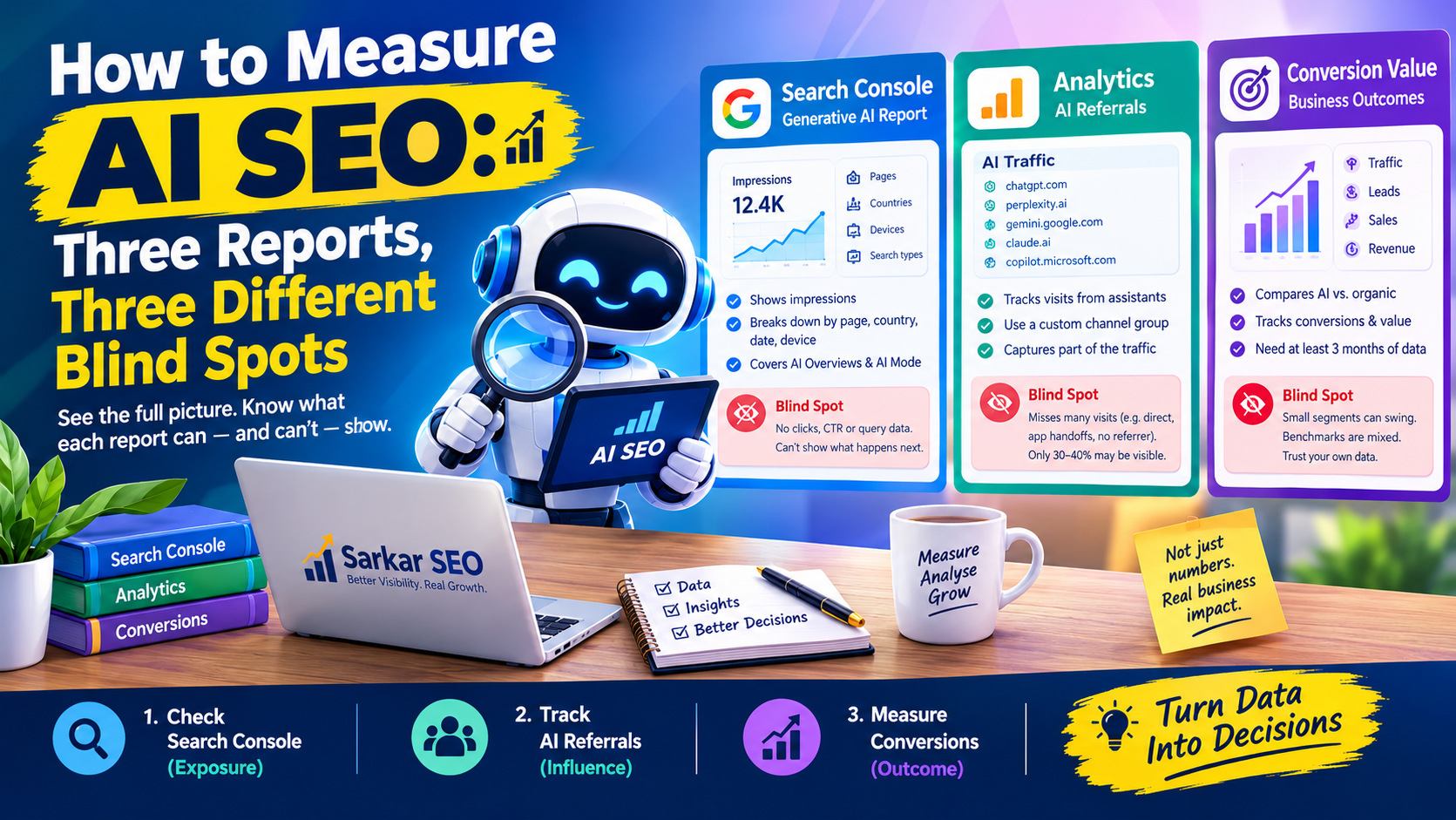
AI SEO is hard to manage because no single report shows it. Google’s Search Console now reports how often your pages appear in AI SEO answers, but not what happens next. Analytics catches some visits from assistants and loses many. Neither shows the conversation where a customer saw your name and never clicked.
The workable answer is to read three sources together and know exactly what each one cannot see. That is how Sarkar SEO approaches AI visibility reporting, and it is the method below.
Source One: Search Console’s Generative AI Report
Google’s help documentation describes a Generative AI performance report for Search that covers AI Overviews and AI Mode. It is built on impressions, defined as how many times links to your site were shown to a user in a generative AI feature. You can break the data down by page, country, date and device, and filter between text-based and multimodal searches such as image queries.
Google says the report was available for all websites worldwide as of 31 August 2026. It may not appear if your site has too few generative AI impressions, or if you have excluded the site from these features. The usual Search Console limits still apply, including the 1,000-row cap.
Two cautions matter. First, the help page frames the report around impressions. Third-party write-ups say it carries no clicks, click-through rate or query data, though I could not confirm that against Google’s wording. Second, Google states that traffic from AI Overviews and AI Mode is counted in the Web search type of the standard Performance report. Those clicks are in your totals, but you cannot isolate them.
In our view, dividing standard clicks by AI impressions to get a click rate mixes two different populations and produces a number nobody can interpret.
Source Two: AI Referrals in Analytics
Visits from assistants arrive with a referrer, such as chatgpt.com, perplexity.ai, gemini.google.com, claude.ai or copilot.microsoft.com. In GA4 you can group them with a custom channel:
- Open Admin, then Data Display, then Channel Groups, and create a new group.
- Add a channel named “AI Traffic” where Source matches a regular expression listing those domains.
- Move the channel above Referral. GA4 assigns traffic to the first rule that matches, so a lower position means AI visits never reach your rule.
Keep the pattern lowercase, because GA4 regex is case-sensitive, and review it quarterly since platforms change domains without notice.
This captures only part of the picture. One practitioner guide lists the leaks: links copied and pasted into a browser arrive as Direct; app-to-browser handoffs can drop the referrer; privacy features strip it; unlinked brand mentions leave no trace; and some visits arrive with a source but no medium, landing in Unassigned. Clicks from Google’s AI Overviews arrive as ordinary Organic Search.
The same guide cites industry estimates that visible referrals are only about 30 to 40 percent of AI-driven visits. Treat that as a rough estimate, not a measured fact. As an illustration only, if your channel shows 120 AI sessions in a month, the true figure could plausibly be 300 to 400. Read your number as a floor.
Source Three: Conversion Value, Read Carefully
Many articles claim AI visitors are worth several times more than ordinary ones. The evidence is mixed. One 2026 benchmark roundup reports Adobe Analytics data from March 2026, covering over a trillion US retail visits, in which AI-referred traffic converted 42 percent better than non-AI traffic. The same roundup notes a peer-reviewed ecommerce study in Marketing Science where ChatGPT referrals converted worse than traditional channels, using older data.
Traffic share varies too. The roundup lists Conductor’s analysis of 13,770 enterprise domains at about 1.08 percent of sessions from AI referrals, while an Ahrefs sample of roughly 35,000 sites in early 2025 showed about 0.1 percent. Several of these datasets come from vendors who sell AI visibility products, and baselines differ, so the multiples are not interchangeable.
The practical lesson is to trust your own data over borrowed benchmarks. Compare your AI channel against organic for at least a quarter. Small segments can swing on a single order.
Record all four on the same date each month, and add a note whenever you publish, update or restructure key pages. Sarkar SEO recommends reading trends across at least three months before drawing conclusions, since both AI answers and tracking methods shift.
Mistakes That Distort the Picture
Treating impressions as visits is the commonest. An impression means a link was shown, not that anyone saw it or clicked.
Judging from one month is the second. Preliminary data in Search Console is marked and may change, and a single order can move a small conversion segment.
The third is forgetting maintenance. An outdated regex quietly shrinks your AI channel and makes performance look worse than it is.
Turning Numbers Into Decisions
Measurement is only useful if it changes what you do. If impressions rise but referrals stay flat, your pages are being used in answers without prompting clicks, so test clearer next steps or stronger reasons to visit. If referrals rise but conversions lag, look at what those landing pages ask visitors to do. If neither moves, the problem likely sits upstream, in relevance or access.
If you want help setting up this reporting, Sarkar SEO can configure the channel group, build a monthly dashboard and explain what the figures do and do not prove. Start with the Search Console report today, since it costs nothing and shows whether Google is already using your pages.
